
How to Track Recovery Outcomes with CRM Tools
Recovery centers often struggle with outdated systems that make it hard to track client progress and program success. A centralized CRM system, like Recovery Center CRM, simplifies this process by organizing critical data - such as client profiles, treatment milestones, and demographic details - into one platform. It also automates tasks, generates reports, and provides actionable insights to improve outcomes.
Key Benefits of Using Recovery Center CRM:
- Tracks client progress in areas like sobriety, mental health, housing, and employment.
- Automates routine tasks, such as appointment reminders and follow-ups.
- Generates reports tailored to funders, boards, and regulators.
- Provides analytics tools to identify trends and refine programs.
- Ensures data security with role-based permissions and compliance with regulations.
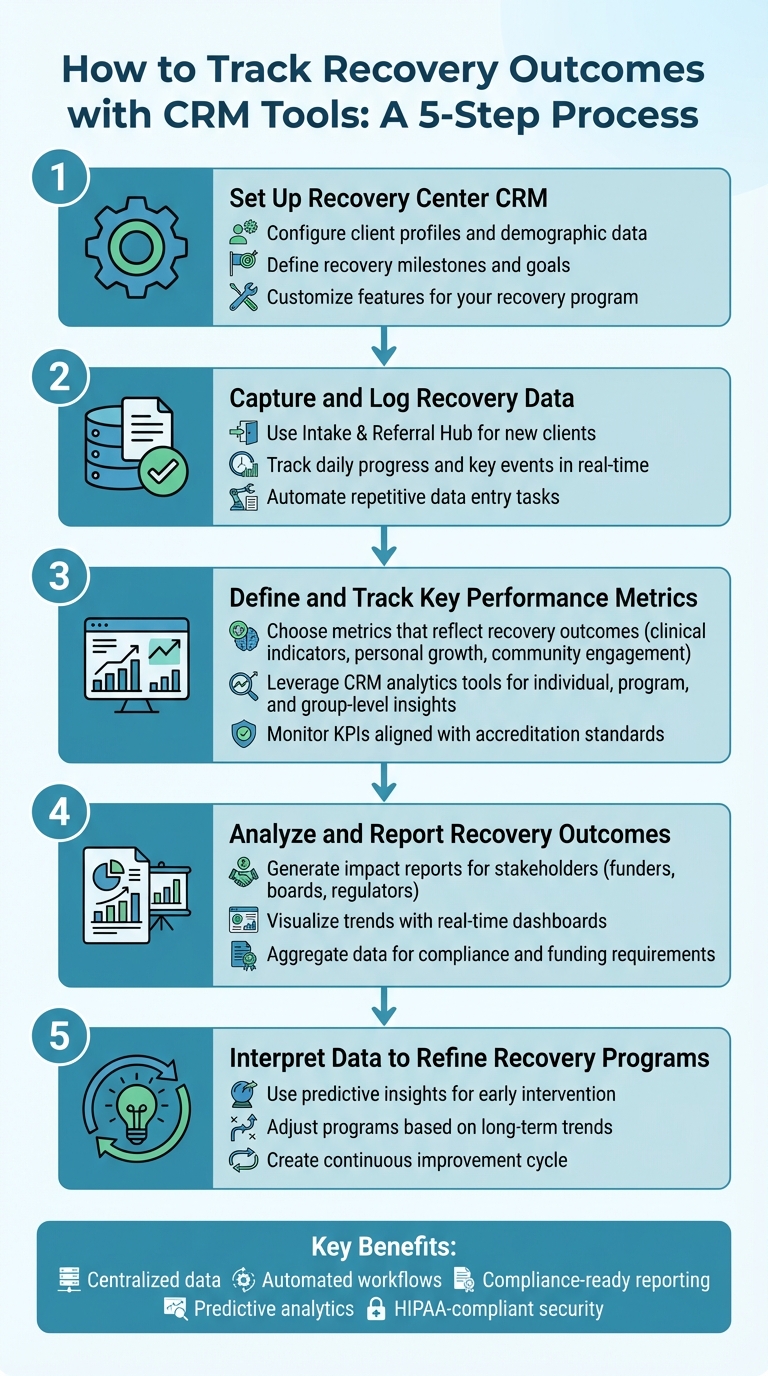
5-Step Process for Tracking Recovery Outcomes with CRM Tools
Step 1: Set Up Recovery Center CRM for Outcome Tracking
Getting your CRM set up correctly is the foundation for tracking meaningful outcomes over time. Recovery Center CRM focuses on three key areas: client profiles, recovery milestones, and program-specific features. Here's how to configure everything to make the most of your system.
Configure Client Profiles and Demographic Data
Begin by creating detailed client profiles. This centralized database allows you to store essential details like demographics, clinical history, and challenges affecting health outcomes.
You can also tailor fields to capture specific barriers, such as transportation difficulties or food insecurity. The table below outlines the key data categories you should configure and how often to update them:
| Data Category | Key Metrics to Configure | Collection Frequency |
|---|---|---|
| Demographics | Age, background, housing, employment, support system | Initial Intake / Quarterly |
| Clinical Progress | Sobriety duration, health evaluations, treatment adherence | Daily / Weekly |
| Mental Health | Mood tracking, stress levels, coping strategies | Weekly |
| Life Stability | Housing status, financial health, professional goals | Monthly / Quarterly |
| Support Network | Group participation, peer connections, family engagement | Weekly |
Define Recovery Milestones and Goals
The next step is to set measurable milestones to track progress effectively. Recovery is highly individual, so your CRM should capture both short-term successes and long-term growth. Establish milestones for daily, weekly, monthly, and yearly goals to reflect both immediate improvements and sustained recovery, with quarterly evaluations to assess overall progress.
To make this process easier, automate reminders for appointments and medication schedules. This not only helps clients stay on track but also reduces the workload for your staff.
Customize Features for Your Recovery Program
Tailor the CRM to meet the specific needs of your recovery program. Use custom fields to track unique data points relevant to your services. These customizations convert raw data into actionable insights, which can be used for stakeholder reports or funding applications through the platform’s impact reporting tools.
Additionally, configure the Intake & Referral Hub and set up automated workflows to align seamlessly with your team’s current processes. This ensures the CRM enhances your operations rather than requiring significant adjustments to your existing workflow.
Step 2: Capture and Log Recovery Data
Once the system is configured, the next step is ensuring consistent data capture. Keeping accurate, real-time records is critical. Recovery Center CRM acts as a central hub for storing demographic details, medical histories, treatment plans, and progress notes, giving your team a full picture of each client's recovery journey.
Start with the Intake and Referral Hub
The Intake & Referral Hub simplifies how new clients are added to your system. It helps manage referrals from courts, public defenders, and treatment programs while tracking key metrics like court-ordered compliance and "time-to-care." By consolidating all intake documentation in one place, you avoid scattered records and ensure every client begins with a complete, organized profile. Once profiles are set, you can seamlessly move on to documenting daily interactions.
Keep Track of Daily Progress and Key Events
After intake, it's crucial to log every interaction as it happens. Record case notes, drug test results, bed availability, and curfew compliance in real time. The CRM’s multi-channel communication tools - like integrated email, SMS, and telephony - make it easy to document follow-ups directly in the system. This ensures nothing slips through the cracks, with every event, from therapy sessions to housing updates, reflected in the client’s record.
"By monitoring client progress, the program can adapt its support strategies to better meet individual needs. The ability to generate reports allows for informed decision-making, continuously improving policies and procedures." - Bee Purple
Automate Repetitive Data Entry Tasks
To save time and improve accuracy, automation can handle routine data entry. Automating tasks like follow-up reminders, medication schedules, and recovery milestones ensures no critical data is missed. Features like prioritized outreach help staff focus on high-risk clients, ensuring they get the attention they need. These workflows free up your team to focus on care while maintaining HIPAA compliance through role-based access and audit trails.
Step 3: Define and Track Key Performance Metrics
Once you've started recording data, the next step is pinpointing the metrics that truly matter. These key performance indicators (KPIs) are the benchmarks that reveal both client progress and the overall success of your program. Without them, you're essentially gathering data without a clear purpose. Selecting the right metrics ensures you can effectively measure recovery outcomes and make informed decisions.
Choose Metrics That Reflect Recovery Outcomes
Focus on metrics that directly highlight recovery progress. For example, track clinical indicators like sobriety rates, adherence to treatment plans, and health evaluations on a daily or weekly basis. Broaden the scope by monitoring personal growth metrics, such as employment status, housing stability, and family relationships, which can be reviewed monthly. Additionally, keep an eye on community engagement - weekly tracking of group participation and connections with peers ensures that clients remain active in their recovery networks.
Accreditation organizations like the Joint Commission and CARF emphasize the importance of standardized outcome tracking. Recovery Center CRM aligns with these standards by offering a compliant data framework. This not only enhances accountability but also provides a solid foundation for refining your recovery strategies.
Leverage Recovery Center CRM's Analytics Tools
With your KPIs in place, Recovery Center CRM takes things further by offering powerful analytics tools to evaluate your program's performance. These tools allow you to track progress on three levels: individual clients, overall program performance, and group trends.
For individual clients, you can monitor metrics like goal achievement, duration of abstinence, and therapy attendance. This real-time data helps you fine-tune treatment plans to better meet each client's needs. On a broader scale, the platform provides insights into program completion rates, average lengths of stay, and demographic patterns - helping you gauge the overall impact of your initiatives and identify areas for improvement.
The CRM’s data insights feature consolidates all client data to uncover trends and patterns. For instance, you can identify common triggers, evaluate the success rates of specific interventions, and assess how different support systems influence recovery outcomes. This bird’s-eye view allows you to tailor strategies for specific groups of clients, moving away from a one-size-fits-all approach. Plus, these insights seamlessly integrate with the automated workflows and real-time data capture set up in earlier steps, ensuring your program evolves with precision and purpose.
Step 4: Analyze and Report Recovery Outcomes
Once you've tracked metrics and maintained progress logs, the next step is turning that raw data into meaningful reports. These reports provide clear insights to funders, boards, and regulators, showcasing program effectiveness and supporting strategic decisions. Recovery Center CRM simplifies this process by transforming your data into professional, actionable narratives.
Generate Impact Reports for Stakeholders
Different stakeholders care about different details. For example, state and federal agencies often focus on demographic trends, admission and discharge statistics, and compliance with mandated metrics. On the other hand, funders are more interested in success rates, occupancy trends, and proof that their financial support is driving real results. Recovery Center CRM makes it easy to tailor reports to meet the specific needs of each audience, ensuring they get exactly what they need - nothing more, nothing less.
Start by selecting your desired reporting period - whether it's weekly, monthly, quarterly, or annually - and then choose the metrics you want to highlight. The platform automatically gathers data like client progress, program completion rates, and demographic details into polished reports. You can also include visual elements like charts and graphs, which make complex information easier to understand at a glance. This customization saves time and ensures you're ready for grant applications, board presentations, or compliance audits without the hassle of manually creating spreadsheets. Additionally, real-time dashboards complement these reports, offering an instant overview of key metrics.
Visualize Trends with Dashboards
While detailed reports are great for formal presentations, dashboards provide a quick, real-time view of your program's health. Recovery Center CRM offers customizable dashboards that let you focus on the metrics that matter most to your daily operations. For example, you can track weekly progress timelines to monitor milestones, review monthly assessment scores for changes in outcomes, or check daily engagement metrics to measure participation in recovery activities.
These visual tools make it easier to identify patterns. If group participation suddenly drops or multiple clients face challenges at the same stage, dashboards help you catch these issues early. This proactive approach allows you to respond quickly, rather than waiting until the next formal review to uncover problems. Think of the dashboard as your go-to tool for staying on top of program performance.
Aggregate Data for Compliance and Funding
When it comes to accreditation and funding, structured data reporting is non-negotiable. Organizations like CARF and The Joint Commission (JCAHO) require detailed outcomes management, stakeholder feedback, and data-driven improvements. Recovery Center CRM's reporting features are designed to meet these rigorous standards, ensuring your program aligns with both state and federal regulations.
The system compiles critical data - such as admissions, demographics, occupancy rates, and clinical outcomes - into formats that are ready for audits and funding renewals. Whether you're preparing for a state-specific review or a federal grant application, Recovery Center CRM streamlines the process, making compliance and funding tasks much more manageable .
sbb-itb-ce23a48
Step 5: Interpret Data to Refine Recovery Programs
Gathering data is just the starting point - its true power comes from interpreting that data to improve recovery programs. Recovery Center CRM doesn't just track information; it identifies patterns that highlight what’s effective and what needs tweaking. This transforms your CRM into a tool for ongoing refinement. Plus, predictive insights can help your team step in early when it matters most.
Use Predictive Insights for Early Intervention
Predictive analytics can spot potential issues before they become major problems. Recovery Center CRM keeps an eye on behavioral changes like missed appointments or reduced engagement, along with key health indicators such as sleep patterns, appetite, and treatment adherence. When these metrics show concerning shifts, the system sends automated alerts and reminders to staff, enabling timely intervention. This proactive approach moves your team away from reacting to crises and toward preventing them. It aligns with a broader trend - by 2022, the big data and business analytics market was projected to hit $274.3 billion, showing just how crucial predictive tools have become.
Adjust Programs Based on Long-Term Trends
Short-term results can be encouraging, but understanding long-term trends is where real progress happens. Recovery Center CRM combines immediate alerts with in-depth trend analysis to drive continuous improvement. By analyzing outcomes at individual, program-wide, and cohort levels, the system uncovers patterns that inform adjustments to treatment strategies. For example, if certain demographics show higher relapse rates, you can intensify their support. These insights also help meet accreditation standards. Regularly reviewing these trends ensures that your programs evolve based on solid evidence, not guesswork, ultimately leading to better outcomes for those in your care.
Best Practices for Effective CRM Outcome Measurement
To get the most out of Recovery Center CRM, focus on key areas like data security, workflow integration, and advanced analytics. These elements ensure sensitive data stays protected, operations run smoothly, and recovery outcomes improve. Building on earlier steps like setup and data collection, these strategies make your outcome tracking both reliable and actionable.
Prioritize Data Security and Role-Based Permissions
Safeguarding client information isn’t just a good practice - it’s a legal and ethical requirement. Recovery Center CRM uses role-based permissions to control access to Protected Health Information (PHI). This means users only see what’s relevant to their role. For instance, a clinician might access detailed treatment records, while an outreach coordinator sees only contact details and scheduling. This structure supports HIPAA compliance and encourages secure teamwork across different disciplines.
The system also keeps a detailed log of all access and changes through audit trails, employs end-to-end encryption, and performs regular automated backups to meet strict regulatory standards. To maintain compliance with HIPAA and 42 CFR Part 2, regular audits and targeted training for each role are essential.
Streamline Scheduling and Outreach Integration
Integrating Recovery Center CRM with scheduling and outreach workflows eliminates inefficiencies and reduces errors. Automated scheduling tools handle appointments and send reminders to both staff and clients, cutting down on no-shows and keeping records up to date. The CRM can even prioritize outreach efforts by risk level, using external data sources like EMS reports to ensure high-need individuals get immediate attention.
When linked with existing Electronic Medical Record (EMR) or Electronic Health Record (EHR) systems, the CRM ensures consistent data and avoids duplicate entries. Additionally, automated task prioritization within the platform ensures urgent matters, like crisis responses, are addressed before routine administrative tasks.
Leverage AI-Enhanced Analytics for Actionable Insights
Once your CRM is securely integrated, advanced analytics can help transform raw data into meaningful actions. Recovery Center CRM’s AI tools analyze behavioral patterns, health markers, and program compliance to identify early warning signs of relapse. The system tracks key metrics - such as appointment attendance, engagement levels, and vital signs - and sends automated alerts when risks increase, like missed sessions.
Real-time dashboards make it easy to spot trends in patient progress and operational efficiency, giving your team the information they need for timely decisions. By managing large datasets, automated analytics also reduce staff burnout, allowing clinicians to focus on high-priority cases. Beyond improving clinical outcomes, predictive insights can highlight the program’s impact and return on investment - critical for securing funding and grants.
Conclusion
This guide walked through the process of setting up, capturing, measuring, analyzing, and interpreting recovery data using Recovery Center CRM. By sticking to these steps, you can build a data-focused foundation that supports better clinical decisions and streamlines operations. Centralizing data and automating workflows allows your team to dedicate more time to hands-on recovery support.
Prioritizing best practices in data security, workflow integration, and AI-powered analytics ensures that outcome tracking remains both reliable and actionable. These approaches not only align with regulatory standards but also enhance recovery outcomes. Early identification of relapse triggers, personalized care plans based on emerging trends, and evidence-backed reporting for stakeholders all contribute to advancing your recovery center's goals.
The advantages go beyond clinical results. Lowering administrative workloads reduces repetitive tasks, helping staff avoid burnout and focus on critical cases. Automated reminders improve follow-up rates and build client trust. Custom impact reports provide the documentation needed to secure funding and grants, ensuring financial stability and program growth.
With these benefits in mind, organizations can use CRM insights to tackle future challenges. Those that adopt CRM tools for outcome measurement are better equipped to meet accreditation standards and adapt to evolving demands in recovery care. Aggregating data across programs, visualizing long-term trends, and making adjustments based on predictive insights create a cycle of continuous improvement that benefits everyone - from individual clients to state-level health officials.
Recovery Center CRM provides the tools to track key metrics, evaluate success, and demonstrate impact. Whether managing a single facility or overseeing a state-wide network, the platform is flexible enough to meet your needs while adhering to the strict compliance and security standards required in behavioral health. Set clear objectives, maintain consistent data practices, and let these insights guide the growth and evolution of your programs.
FAQs
How does Recovery Center CRM protect sensitive data and ensure compliance?
Recovery Center CRM puts a strong emphasis on data security and compliance, ensuring that sensitive client information is well-protected. The platform aligns with stringent regulations like HIPAA and 42 CFR Part 2, which are critical in the U.S. for safeguarding health-related data. To meet these standards, it incorporates essential protections such as encryption, access controls, and audit trails, all designed to uphold confidentiality and data integrity.
By consolidating client information, streamlining workflows, and generating detailed reports, Recovery Center CRM not only simplifies the compliance process but also ensures secure data management across the board. These features allow recovery centers to meet both legal and ethical obligations, guaranteeing that sensitive client data is handled with care and professionalism.
What are the most important metrics to track for recovery progress?
To track recovery progress effectively, keep an eye on critical metrics like sobriety duration, relapse frequency, program completion rates, mental health improvements, social and employment milestones, and long-term stability. These metrics offer a clear picture of each person's recovery journey and highlight areas where programs can be adjusted to better serve participants.
By focusing on these indicators, recovery centers can showcase progress, pinpoint challenges, and provide the support individuals need to achieve lasting results.
How can CRM tools use predictive analytics to help prevent relapses?
Predictive analytics in CRM tools, like Recovery Center CRM, plays a critical role in reducing relapse risks by spotting early warning signs and patterns that suggest a client might be struggling. By examining data such as treatment adherence, engagement levels, mental health metrics, and known triggers, these tools help recovery programs step in before setbacks occur.
Take this example: if a client starts participating less in activities or shows heightened stress levels, the CRM can flag these behavioral shifts. This alert prompts staff to deliver timely, personalized support tailored to the client’s specific challenges. Such an approach not only minimizes the risk of relapse but also strengthens long-term recovery outcomes. Predictive analytics equips recovery centers with the ability to intervene early, helping clients maintain stability and make steady progress.